
WorshipScreen: Church Presentation Software for Worship Songs, Bible Verses and Sermons
A church service may look simple from the congregation’s perspective, but behind the scenes there can be a significant amount of preparation. Worship songs have to be ready, Bible passages need to be available, announcements must be displayed at the right moment, and videos or images may need to be shown without interrupting the service. A reliable presentation system can bring all these tasks together and make the work easier for pastors, worship leaders, and media volunteers.
WorshipScreen is a browser-based church presentation platform created for this purpose. It allows churches to organize worship lyrics, Bible verses, sermon materials, images, videos, announcements, and countdowns in a single environment. The presentation can then be displayed on a projector, television, LED screen, or another compatible display.
The platform is designed to be accessible to churches that do not necessarily have a professional media department. A volunteer can prepare the service in advance and operate the presentation during worship after learning the basic workflow.
What Is WorshipScreen?
WorshipScreen is church presentation software focused on the practical requirements of worship services. Rather than using one application for song lyrics, another for Bible passages, and another for videos, a church can organize these different elements within the same presentation workflow.
The service operates through a web browser. This means users can prepare and manage content without relying on a traditional desktop presentation application installed on one particular computer.
The main features are centered around common church presentation tasks. Users can create and reuse worship songs, prepare Bible passages, build playlists for individual services, add images and videos, create countdowns, and manage the content shown on the congregation’s screen.
This makes WorshipScreen suitable for weekly Sunday services as well as Bible studies, conferences, prayer meetings, youth events, special celebrations, and other church gatherings.
A Free Tool for Organizing Church Presentations
Cost is an important consideration for many churches. Smaller congregations may rely entirely on volunteers and may not have a large budget for specialized media software.
free worship software can provide a practical alternative for churches that need core presentation functions without purchasing expensive software licenses. WorshipScreen is available to use for free, while donations can support the ongoing development of the project.
The platform can be used with equipment that many churches already have. A laptop can be connected to a projector or television, while another device can be used to control the presentation. Depending on the available equipment, churches can choose a setup that fits their room and technical resources.
The goal is not to make every church use the same technical configuration. Instead, the platform provides a flexible presentation environment that can be adapted to different situations.
Getting Started With WorshipScreen
The first step is to create an account and open WorshipScreen in a compatible web browser. Once inside the platform, users can begin preparing their content.
It is useful to configure the visual appearance before building a large library. Font type, font size, text position, colors, and backgrounds all affect how easily people can follow the presentation.
Readability should always come first. The text must be large enough for people at the back of the room to see. Strong contrast between text and background is also essential.
After the general appearance has been configured, the church can start creating its reusable content.
Creating a Library of Worship Songs
For churches that use presentation screens every week, a song library can save a considerable amount of preparation time.
Instead of creating the lyrics again before every service, the media operator can enter a song once and save it for future use. When the church plans another service, the existing song can simply be added to the new playlist.
When entering lyrics, it is important to check the automatically generated slides. A computer can divide text into slides, but the result may not always correspond to the way people naturally sing the song.
Long sections should be divided into readable blocks. Lines that belong together should remain together, and unnecessary text should not be placed on one screen.
The actual arrangement of the worship team should also be considered. If the chorus is repeated, the presentation should allow the operator to move back to the appropriate slide. If the team skips a verse, the operator should be able to skip it as well.
Over time, this library becomes one of the most useful resources in the system.
Preparing a Service Playlist
Once the songs are available, the operator can create a playlist for the upcoming service.
The playlist is essentially a visual plan of the event. It can include every item that the congregation is expected to see.
A typical service could contain:
- a countdown before the beginning;
- a welcome message;
- several worship songs;
- announcements;
- Bible readings;
- sermon Scripture;
- presentation slides;
- photographs;
- videos;
- closing information.
The exact order depends on the church. WorshipScreen can be adapted to different service formats rather than requiring every congregation to follow a fixed structure.
It is useful to give each playlist a clear name. For example, the media team can use the date and service type so that the correct playlist is easy to find before the congregation arrives.
Displaying Worship Lyrics Clearly
Displaying lyrics is one of the central purposes of church presentation software.
The congregation needs to be able to read the current line comfortably while singing. This requires more than simply putting the lyrics on a screen.
Text size, spacing, contrast, and slide timing all affect the experience.
The operator should advance slides in response to the worship leader. If the leader repeats a chorus, the operator should repeat the corresponding slide. If the song changes unexpectedly, the presentation should change with it.
It is also important not to put too many words on one slide. A crowded slide may technically contain the correct lyrics but still be difficult to follow.
A clean and consistent design allows people to concentrate on worship instead of trying to understand the presentation interface.
Using Bible Verses During Worship and Sermons
Bible passages can be prepared in advance and included in the service playlist.
This is particularly helpful when a pastor plans to use several Scripture references during a sermon. Instead of searching for each passage while the service is already in progress, the media operator can prepare the passages beforehand.
The operator should verify every reference and confirm that the selected Bible translation matches the one being used by the pastor or church.
Scripture presentation can also help the congregation follow a reading together. A passage displayed on the main screen gives everyone the same visual reference.
At the same time, the operator should remain flexible. A pastor may refer to an additional passage during a sermon that was not included in the original plan. The presentation system should allow the operator to respond without disrupting the service.
Supporting the Sermon With Visual Content
A sermon may contain more than Scripture references. Depending on the subject, the pastor may want to display an image, quotation, diagram, video, or several key statements.
WorshipScreen allows these elements to be included in the overall service presentation.
The best approach is to use visual content with a clear purpose. A slide should help the congregation understand an important point or find a reference. It should not simply add decoration.
For example, if the pastor is discussing a particular Bible passage, the screen can display the passage while the pastor explains it. If an event is being announced, a photograph and a few essential details may be more effective than a paragraph of text.
This makes the screen an additional communication tool rather than a replacement for the speaker.
Adding Announcements to the Playlist
Church announcements can be prepared before the service and added to the weekly playlist.
This is useful for communicating information about upcoming meetings, Bible studies, prayer groups, conferences, youth activities, community projects, or special worship events.
An announcement slide should contain only the information people need. A large headline, date, time, and location are often more useful than a long block of text.
Images can also be used when appropriate. A photograph from a previous event may help people recognize the activity and understand what the announcement is about.
Because announcements can be saved and reused, the media team can also create a consistent visual style for recurring church activities.
Working With Images and Videos
Visual media can make a service more dynamic, particularly when the church wants to show photographs, testimonies, event information, or video messages.
WorshipScreen supports images and video content as part of the presentation workflow. These elements can be placed in the playlist alongside songs and Scripture.
Videos should always be tested before the congregation arrives. The operator needs to confirm that the correct file or online video opens, that the picture fits the screen, and that audio works when sound is required.
Internet-dependent material deserves additional attention because an unstable connection can cause delays during a live service.
If a video is essential to the service, the media team should make sure there is a reliable way to play it and should avoid discovering technical problems for the first time while the congregation is watching.
Using a Countdown Before Worship
A countdown can help create a clear beginning to a church service.
Instead of displaying a blank screen while people enter the building, the church can show a timer indicating when worship will begin. This can make the transition from informal conversation to the formal start of the service more noticeable.
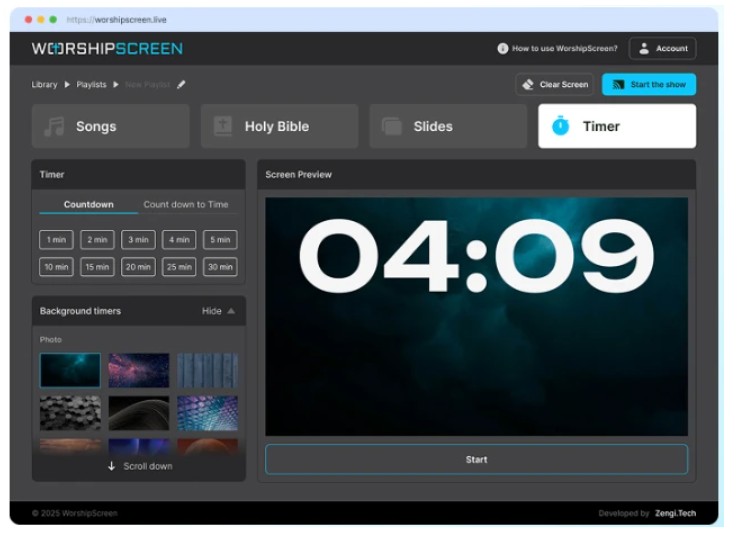
WorshipScreen provides countdown functionality that can be used for a selected duration or toward a particular start time. The countdown can also be combined with visual backgrounds.
This feature can be useful for Sunday services, conferences, youth gatherings, prayer meetings, and other events where people need a clear indication that the program is about to start.
Connecting the Presentation to a Screen
WorshipScreen can be used with different types of display equipment.
A common church setup consists of a laptop connected to a projector or television using HDMI. With an extended display configuration, the operator can keep the controls on the laptop while the congregation sees only the presentation.
Other churches may use a television with browser capabilities. Depending on the equipment and network configuration, the presentation can be displayed on the TV while a different device controls the content.
The technical setup should be tested before the service. The media team should verify the projector or TV, cables, screen resolution, Internet connection, browser, and audio.
A short test can prevent many avoidable problems.
Preparing the Presentation Before the Service
The presentation should be checked before people enter the church.
The operator should review the complete playlist from beginning to end. Songs need to be checked for correct lyrics. Bible references need to be verified. Announcements should contain current information. Images should display correctly, and videos should be tested.
The actual presentation screen should be used during the test whenever possible. This makes it easier to identify problems with text size and contrast.
The operator should also check what happens between presentation elements. For example, if a video ends unexpectedly or a song is removed from the playlist, the screen should not display private information or an unrelated browser page.
Preparation creates confidence and gives the operator more time to focus on the service itself.
Managing WorshipScreen During a Live Service
Once the service begins, the media operator becomes part of the service team.
The operator does not simply follow the playlist automatically. They need to listen to the worship leader and pastor and respond to changes.
If the worship leader repeats a chorus, the appropriate slide should be shown again. If a verse is skipped, it should be skipped on screen. If the pastor changes the order of the sermon, the operator should adjust the presentation accordingly.
This requires attention but does not necessarily require advanced technical knowledge.
The more thoroughly the playlist is prepared beforehand, the easier it is to manage these changes during the service.
Methodist Worship and Other Denominations
Churches have different worship traditions and service structures. Presentation software should therefore be flexible enough to accommodate those differences.
For churches looking for methodist worship software, WorshipScreen can be used to prepare Methodist services according to the congregation’s own order of worship.
Hymns, contemporary worship songs, Scripture readings, sermon passages, announcements, videos, and other materials can be organized within the same presentation workflow.
The same approach can be used by churches from many other Christian traditions. The software does not define the order or content of worship. It provides tools that allow the church’s existing service structure to be presented clearly.
This flexibility is important because a church may use different formats for Sunday worship, midweek meetings, youth services, or special events.
A Simple Workflow for Volunteers
A good presentation system should not require a technical specialist every week.
A volunteer can follow a repeatable process:
1. Review the Service Plan
Find out which songs, Scripture passages, announcements, images, and videos will be required.
2. Prepare the Playlist
Add the content in the expected order and make sure every item is easy to locate.
3. Check the Slides
Review lyrics, Bible references, text size, backgrounds, and formatting.
4. Test the Equipment
Connect the presentation to the actual projector or TV and check the complete service.
5. Start Before the Congregation Arrives
Open the presentation early enough to resolve unexpected technical problems.
6. Follow the Live Service
During worship, respond to the actual order and timing rather than relying on the playlist alone.
This workflow can become a weekly routine and makes it easier for multiple volunteers to share presentation responsibilities.
Why Preparation Matters More Than Complicated Effects
Church presentation does not have to look like a television production to be effective.
The most important things are clarity, accuracy, timing, and reliability.
A beautifully designed slide is not useful if the lyrics are too small to read. A sophisticated video is not helpful if it cannot load. A detailed sermon presentation is not effective if the screen is so crowded that nobody knows what to look at.
WorshipScreen can be used to create visually organized services while keeping the technology relatively simple.
The congregation should be able to focus on singing, Scripture, prayer, and preaching. The presentation should support these activities rather than compete with them.
Building a Long-Term Church Presentation Library
One of the benefits of using a reusable system is that the church’s content library grows over time.
Every new song can be added once and reused. Frequently used Scripture passages can be prepared quickly. Standard announcements can be saved and adapted. Visual backgrounds can be reused when appropriate.
This means the amount of preparation required for each future service can decrease.
A church can also develop internal standards for how presentations should look. For example, the media team may agree on a standard font size, text position, background style, and announcement format.
Such consistency is particularly useful when several volunteers operate the presentation on different weeks.
Conclusion
WorshipScreen offers a practical way to organize the visual side of a church service. It can bring worship lyrics, Bible passages, sermon content, announcements, images, videos, and countdowns into one browser-based workflow.
Its free availability makes it accessible to churches that want a useful presentation system without committing to expensive software. It can be used with common church equipment such as laptops, projectors, and televisions, while the browser-based approach gives volunteers flexibility when preparing and controlling services.
The most important part of using any church presentation software is preparation. Build a reusable song library, organize the weekly playlist, check every Bible reference, test videos and equipment, and review the complete presentation before the service begins.
During the live service, the operator should remain attentive and adapt to the worship leader and pastor. When the technology is prepared properly, it can remain in the background and simply provide the congregation with the information it needs at the right time.