Transform Your Old TV into a Smart TV: A Comprehensive Guide
Are you still clinging to your reliable, non-smart television, but craving the convenience of streaming services, apps, and internet browsing? The good news is that you don’t need to replace your entire TV to enjoy these modern features. With a few simple and affordable devices, you can easily transform your existing TV into a smart TV. This guide will walk you through the various options available, helping you choose the best solution to enhance your home entertainment experience without breaking the bank.
## The Easiest Way: Streaming Media Players
Streaming media players are by far the most popular and user-friendly way to make your TV smart. These small, often pocket-sized devices plug directly into your TV’s HDMI port and connect to your home Wi-Fi network. They come pre-loaded with apps for major streaming services like Netflix, Hulu, Disney+, and Amazon Prime Video, and many also offer access to a vast library of other applications.
### Top Streaming Device Options
Here’s a look at some of the leading streaming devices and their key features:
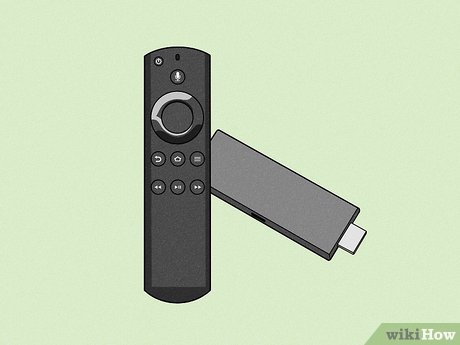
* **Amazon Fire TV Stick:** Known for its affordability and user-friendly interface, the Fire TV Stick offers access to a huge range of apps and a voice remote with Alexa integration.
* **Roku Streaming Stick/Box:** Roku is celebrated for its simple interface and extensive channel store, which includes a wide variety of free and paid streaming options. They offer several different models at various price points.
* **Google Chromecast with Google TV:** This device offers a more integrated Google experience, with a remote and a dedicated interface that curates content from your various streaming services. It also supports Google Assistant.
* **Apple TV:** While generally more expensive, the Apple TV offers a premium experience with a sleek interface, powerful performance, and seamless integration with the Apple ecosystem.
Each of these devices provides a slightly different user experience, so it’s worth researching which one best suits your personal preferences and existing devices.
## Beyond Streaming: Gaming Consoles and Blu-ray Players
While dedicated streaming devices are the most common solution, other electronics you might already own can also add smart capabilities to your TV.
### Gaming Consoles as Entertainment Hubs
Modern gaming consoles like the PlayStation and Xbox are much more than just gaming machines. They function as powerful media hubs, offering access to streaming apps, web browsers, and even Blu-ray playback. If you’re a gamer, a console can be a cost-effective way to get smart TV functionality without purchasing a separate device.
### Smart Blu-ray Players
Many Blu-ray players today come with built-in smart features. These players can connect to the internet, allowing you to stream content directly from popular services and apps. While their app selection might not be as extensive as dedicated streaming devices, they offer a convenient combination of physical media playback and online streaming.
| Device Type | Pros | Cons | Price Range (USD) |
|---|---|---|---|
| Streaming Media Player | Affordable, easy to use, wide app selection, portable | Requires HDMI port and Wi-Fi | $30 – $150 |
| Gaming Console | Excellent performance, multi-functional, large storage | Expensive, larger footprint | $300 – $500+ |
| Smart Blu-ray Player | Combines physical media and streaming, good for movie buffs | Limited app selection, can be slower than dedicated streamers | $80 – $200 |
## The DIY Approach: Connecting a Computer
For the ultimate in flexibility, you can connect a laptop or desktop computer directly to your TV. This essentially turns your TV into a large monitor, giving you access to everything your computer can do, including web browsing, streaming, and running any software.
Factoid: Older TVs can be given a new lease of life with simple, inexpensive devices that add smart capabilities.
To connect a computer, you’ll typically need an HDMI cable. If your TV or computer lacks an HDMI port, adapters may be available, but this can sometimes limit performance. This method offers unparalleled access to online content but requires you to have a computer readily available and to manage its connection to the TV.
### Advantages of Using a Computer
* Full internet browsing capabilities.
* Access to all desktop applications and software.
* Ability to play media files directly from your computer.
* Potentially higher video and audio quality depending on your setup.
## Frequently Asked Questions
### How do I know if my TV has an HDMI port?
Most modern flat-screen TVs manufactured in the last 15-20 years will have at least one HDMI port. They are typically located on the back or side of the TV and are labeled “HDMI.”
### Will I need a special remote for these devices?
Most streaming media players and smart Blu-ray players come with their own dedicated remote controls. Gaming consoles are typically controlled with their standard game controllers, though some may offer media remotes as accessories. When using a computer, you’ll use your computer’s keyboard and mouse.
### Can I access all streaming services on any of these devices?
While most popular services are available across all major platforms, there might be niche apps or specific services that are exclusive to one platform. It’s always a good idea to check the app store of the device you’re considering to ensure it has the services you use most.
## Conclusion
Upgrading your television to a smart TV is more accessible and affordable than ever before. Whether you opt for a dedicated streaming device like a Fire TV Stick or Roku, leverage the multi-functional capabilities of a gaming console, or even connect a computer, the options are plentiful. These solutions allow you to enjoy a world of streaming content, online entertainment, and digital convenience without the need to purchase a brand-new television. By simply plugging in a small device, you can unlock a wealth of new possibilities for your home entertainment system.