“`html
How to Get NOW TV on Your Smart TV: A Comprehensive Guide
Streaming services have revolutionized home entertainment, and NOW TV offers a compelling package of live channels and on-demand content. If you’re wondering how to get NOW TV on your Smart TV, you’re in the right place. This guide will walk you through the process, ensuring you can start enjoying your favorite shows and movies on the big screen in no time. From setting up the app to troubleshooting common issues, we’ve got you covered.
Getting NOW TV on your Smart TV is generally a straightforward process, but the exact steps can vary slightly depending on your TV’s operating system and manufacturer. Whether you have a Samsung, LG, Sony, or another brand of Smart TV, the core principles remain the same: finding and installing the NOW TV app. This article aims to demystify the process, providing clear, actionable steps for a seamless setup. Let’s dive into how you can elevate your viewing experience with NOW TV on your Smart TV.
Understanding NOW TV and Smart TV Compatibility
NOW TV operates on a flexible, contract-free model, offering various “Entertainment,” “Sky Cinema,” “Sky Sports,” and “Kids” passes. To access this content on your Smart TV, the device needs to be compatible with the NOW TV application. Most modern Smart TVs from major manufacturers, typically those running on platforms like webOS (LG), Tizen (Samsung), Android TV/Google TV, or Roku TV, will support the NOW TV app. Older models or those with proprietary operating systems might require an additional streaming device.
Checking Your Smart TV’s Compatibility
Before you begin, it’s wise to confirm if your specific Smart TV model can download the NOW TV app directly. You can usually do this by navigating to your TV’s app store or content marketplace. Search for “NOW TV” within the store. If the app appears and offers an “install” or “get” option, your TV is compatible. Alternatively, you can check the NOW TV website for a list of supported devices, which is regularly updated.
Installing the NOW TV App on Your Smart TV
Once you’ve confirmed compatibility, the installation process is typically as simple as downloading any other app.
Step-by-Step Installation Process
- Power On Your Smart TV: Ensure your TV is connected to the internet via Wi-Fi or an Ethernet cable.
- Access the App Store: Navigate to your TV’s main menu and find the application store (often labeled “Apps,” “App Store,” “Google Play Store,” or “Content Store”).
- Search for NOW TV: Use the search function within the app store to look for “NOW TV.”
- Download and Install: Select the official NOW TV app and choose the “Install” or “Download” option. The app will download and install automatically.
- Launch the App: Once installed, find the NOW TV app in your TV’s app list and launch it.
After launching the app, you’ll be prompted to sign in with your existing NOW TV account credentials or create a new one if you don’t already have an account. If you’re a new user, you might be guided through the process of selecting and purchasing the desired NOW TV passes.
Alternative Methods: Streaming Devices
If your Smart TV isn’t directly compatible with the NOW TV app, don’t worry. You can still enjoy NOW TV on your television using a dedicated streaming device. These devices connect to your TV via HDMI and provide access to a wide range of apps, including NOW TV.
Popular Streaming Device Options
| Device | Compatibility | Setup |
|---|---|---|
| Roku Streaming Stick/Box | NOW TV app available | Plug into HDMI, connect to Wi-Fi, download app from Roku Channel Store. |
| Amazon Fire TV Stick/Cube | NOW TV app available | Plug into HDMI, connect to Wi-Fi, download app from Amazon Appstore. |
| Google Chromecast with Google TV | NOW TV app available | Plug into HDMI, connect to Wi-Fi, download app via Google Play Store. |
| Apple TV | NOW TV app available | Connect to Wi-Fi/Ethernet, download app from the App Store. |
These devices are relatively inexpensive and offer a significant upgrade to older or non-compatible Smart TVs. The setup for each is generally user-friendly, involving connecting the device to your TV and home network, followed by downloading the NOW TV app from the respective device’s app store.
Fact: NOW TV is a popular choice for UK viewers seeking access to Sky content without a long-term contract.
Setting Up and Using NOW TV on Your TV
Once the app is installed, the next step is to get it up and running. This involves signing in and navigating the interface.
Logging In and Navigating the Interface
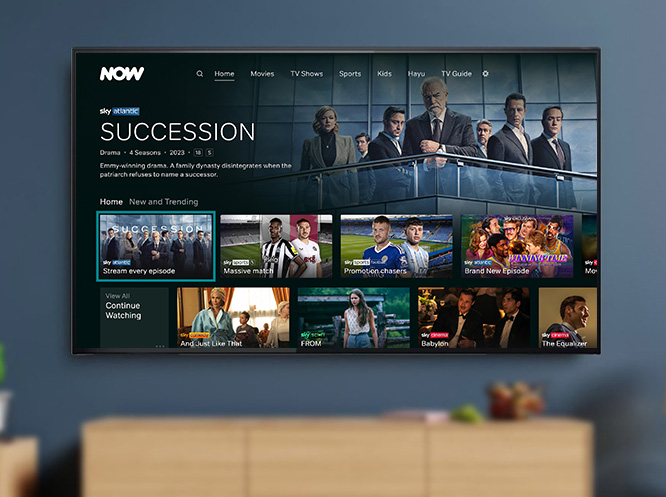
Upon opening the NOW TV app, you’ll be greeted with a login screen. Enter your registered email address and password. If you’ve forgotten your password, there’s usually a “Forgotten Password?” link to help you reset it. After logging in, you’ll see the NOW TV homepage, which typically displays featured content, new releases, and recommendations based on your viewing habits. You can browse different categories like Entertainment, Sky Cinema, Sports, and Kids using the on-screen navigation.
Activating Passes and Watching Content
If you haven’t already purchased passes, you can do so directly through the app or via the NOW TV website. Once you have active passes, simply select the program or movie you wish to watch and press play. The content will stream directly to your TV. For live channels, navigate to the relevant section and select the channel you want to watch.
Tip: Ensure your internet connection is stable and offers sufficient bandwidth (at least 5 Mbps recommended for HD streaming) for the best viewing experience.
Troubleshooting Common Issues
While the process is usually smooth, you might encounter a few hiccups. Here are some common issues and their solutions.
App Not Found or Not Installing
Problem: The NOW TV app doesn’t appear in your TV’s app store, or it fails to install.
Solution:
- Check Compatibility: Re-verify your TV model’s compatibility on the NOW TV website.
- Update TV Software: Ensure your Smart TV’s firmware is up to date. Go to your TV’s settings menu and look for a “Software Update” or “Firmware Update” option.
- Restart TV and Router: Sometimes a simple restart of both your TV and your internet router can resolve download issues.
- Consider a Streaming Device: If compatibility remains an issue, using an external streaming device is the most reliable solution.
Playback Issues (Buffering, Freezing, Poor Quality)
Problem: Video is constantly buffering, freezing, or the quality is poor.
Solution:
- Check Internet Speed: Run an internet speed test on your TV or another device connected to the same network. NOW TV recommends at least 5 Mbps for HD.
- Reduce Network Congestion: Limit the number of devices using your internet connection simultaneously.
- Restart App and TV: Close the NOW TV app completely and restart your TV.
- Clear App Cache: Some TV platforms allow you to clear the cache for individual apps. Check your TV’s settings for this option.
- Use a Wired Connection: If possible, connect your TV directly to your router using an Ethernet cable for a more stable connection.
Did You Know? NOW TV offers 7-day rolling passes, giving you flexibility to subscribe and unsubscribe as needed.
Frequently Asked Questions (FAQ)
Q1: Can I get NOW TV on any Smart TV?
A: While many modern Smart TVs are compatible, it’s essential to check your specific model’s compatibility with the NOW TV app, either through your TV’s app store or the NOW TV website. If your TV isn’t compatible, you can use an external streaming device.
Q2: Do I need a Sky subscription to use NOW TV?
A: No, NOW TV is a separate service from a Sky subscription. You do not need a Sky TV subscription to sign up for and use NOW TV. You purchase passes directly from NOW TV.
Q3: How do I update the NOW TV app on my Smart TV?
A: Most Smart TVs automatically update apps in the background. However, if you suspect your app is outdated,